
Your network IP address is usually the local address your router gave your device, such as 192.168.1.23. You read it in your device's Wi‑Fi or Ethernet settings, or with ipconfig on Windows. If you mean the address the internet sees, that is your public IP, and the What Is My IP homepage shows it. In subnet and router menus, "network address" can also mean a third number, the network ID, such as 192.168.1.0. Most confusion comes from mixing these three up. The table below sorts them out.
The three answers at a glance
| What you mean | Example | Where to read it | Who sees it |
|---|---|---|---|
| Local (network) IP of this device | 192.168.1.23 |
Device settings, ipconfig, ip addr |
Only devices on your network |
| Public (internet) address | 203.0.113.42 |
What Is My IP | Every website and app server you connect to |
| Network address (network ID) | 192.168.1.0 |
Work it out from the local IP and the subnet mask | Your router and devices, for routing |
The examples use reserved documentation and private ranges. Your numbers will differ.
What we saw when we tested one machine
To show what each tool can and cannot see, we checked all three numbers on one Linux test machine on 23 Oct 2026. We used headless Chromium for the web checks.
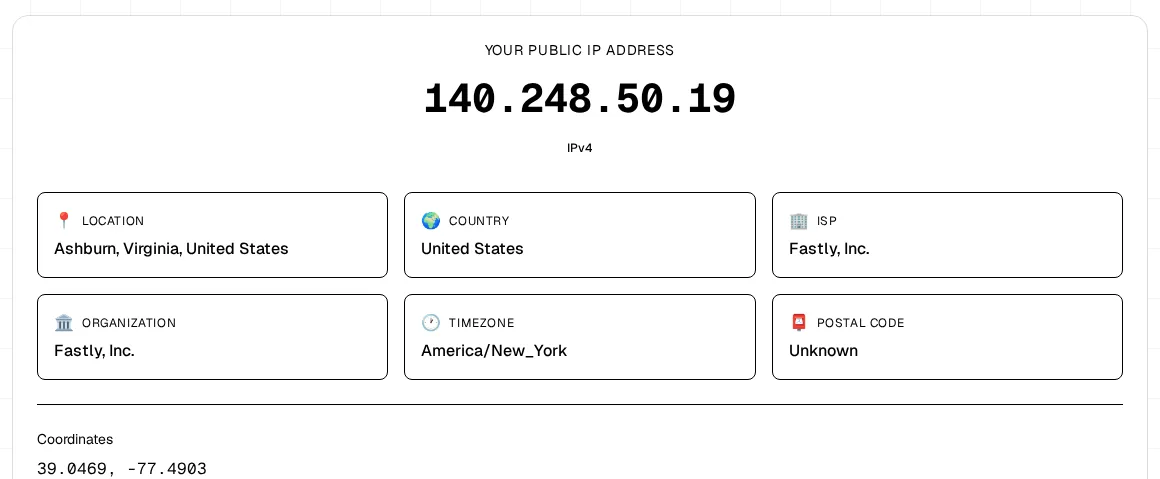
1. The public address, from our homepage. The What Is My IP page reported 140.248.50.x, registered to Fastly, Inc. That machine reaches the internet through a provider's network, so the public address belongs to that network, not to the machine. Over three page loads the last number changed (.16, .127, .19) because the provider sends traffic out from a pool of addresses. Home broadband usually keeps one public IPv4 for longer, though it can still change.
2. The network IP, from the machine itself. ip -4 addr on the same machine printed (trimmed):
2: enp0s3: <BROADCAST,MULTICAST,UP,LOWER_UP>
    inet 172.30.0.2/24 brd 172.30.0.255 scope global enp0s3
3: docker0: <NO-CARRIER,BROADCAST,MULTICAST,UP>
    inet 172.17.0.1/16 brd 172.17.255.255 scope global docker0
The network IP is 172.30.0.2 on the active adapter enp0s3. The second line, docker0, is a virtual adapter for containers. Its state says NO-CARRIER, so it is not the connection in use. From /24, the network address is 172.30.0.0, and ip route showed the gateway at 172.30.0.1. Neither private number appeared anywhere on the homepage.
3. What a website can see of the local address. Our VPN Leak Check asks the browser for WebRTC candidates, which is the way a web page could get at a local address. The browser did not hand over 172.30.0.2. It gave a random mDNS name ending in .local instead:
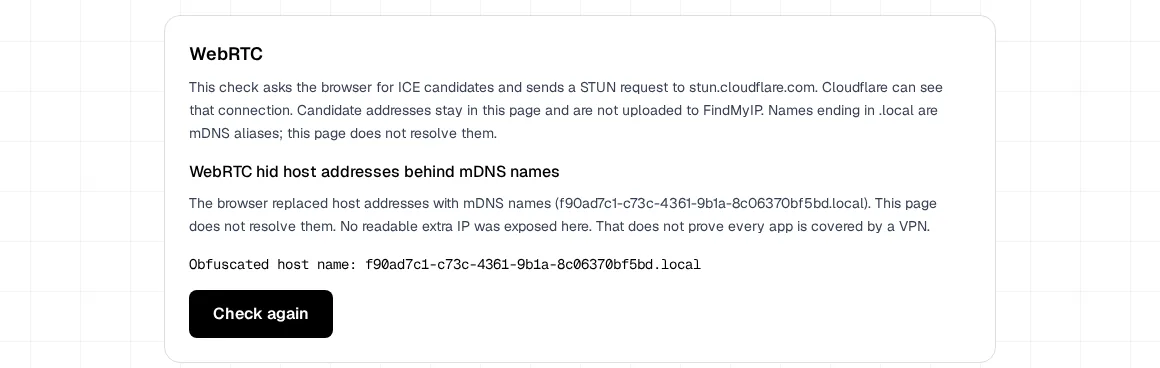
So in this test, no website was able to show the network IP. That is normal: modern browsers often hide the local address this way. Results still depend on the browser, its settings, and extensions. WebRTC IP leak basics explains the mechanism. In practice, read your network IP on the device, not on a website.
How to find your network (local) IP
Check the connection you are actually using, Wi‑Fi or cable.
- Windows: open Command Prompt and run
ipconfig. Under "Wireless LAN adapter Wi‑Fi" or "Ethernet adapter", read IPv4 Address. The same block lists Subnet Mask and Default Gateway. - Mac: System Settings → Wi‑Fi → Details → TCP/IP. Or in Terminal:
ipconfig getifaddr en0(tryen1if it prints nothing). - Linux:
ip -4 addrorhostname -I. Ignorelo(127.0.0.1) and idle virtual adapters. - iPhone or iPad: Settings → Wi‑Fi → the info button next to your network → IP Address.
- Android: Settings → Network & internet → Wi‑Fi → your network. Menus vary by brand.
- Router: the client or DHCP list on the admin page shows every device's local address.
Which line do I read when there are several?
VPN apps, Docker, virtual machines, and Hyper-V add extra adapters, each with its own address. Pick the adapter that is connected and has a default gateway. Virtual adapters usually have no gateway, or show as down. If the address starts with 169.254, the device did not get an address from the router. Check the Wi‑Fi password or the cable before anything else.
How to find your public (internet) address
Open What Is My IP. It shows the address the site received for that page request, after your router, carrier, and any VPN. Every device on the same home Wi‑Fi normally shows the same public IPv4, because the router shares one address. Public vs private IP address explained covers why.
Two cases make the public side look strange:
- Your router's WAN address differs from what the homepage shows. If the WAN starts with
100.64to100.127, your ISP probably uses carrier-grade NAT. Paste the WAN address into the CGNAT Check to classify it. What is a WAN IP address? explains the router side. - A VPN is on. The homepage then shows the VPN's exit address. Your network IP stays the same.
How to work out your network address
The network address is your local IP with the device part set to zero. The subnet mask tells you which part is the device part:
192.168.1.23with mask255.255.255.0(/24) → network address192.168.1.010.0.5.17with mask255.255.0.0(/16) → network address10.0.0.0
You never type the network address into a browser. It names the whole local network, not a device, so 192.168.1.0 will not open your router. To reach the router, use the default gateway, often 192.168.1.1.
Is the IPv6 line in ipconfig my public IP?
Not exactly, although one popular Windows tutorial on YouTube labels the IPv6 line as the public IP. On a network with IPv6, a device can hold a global IPv6 address that sites reach directly. On Windows, ipconfig may list a permanent IPv6 Address and a Temporary IPv6 Address, and outgoing connections often use the temporary one. But your public IPv4 usually does not appear in ipconfig at all, because it lives on the router or at the ISP. One page request uses one address family, so the homepage shows either your IPv4 or your IPv6, not both. IPv4 vs IPv6 for normal users covers the difference.
Bottom line
"My network IP" usually means the local address on your device. You read it in settings or ipconfig, and in our test no website could see it. "My internet address" is the public IP, which the homepage shows. "Network address" in subnet terms is the network ID, such as 192.168.1.0, worked out from the local IP and the mask. Read the number that matches your question, and you will know which tool to use.