
For an ISP search on your own connection, open the ISP Lookup tool: it reads your public IP and shows the provider registered for it, with its ASN. To check a different address, type that IP into the same page. A WHOIS record for an IP tells you who owns the network block, and an address search on a broadband map tells you which providers sell service at a street address. Those are three different questions, so pick the one you need first.
Which ISP search do you need?
"ISP search" is used for at least three jobs. Search results mix all of them, plus a few pages where ISP stands for a state police force.
| You want to know | Use | What you get |
|---|---|---|
| Who is my internet provider right now? | ISP Lookup on the device you are using | Provider name, organization, ASN, approximate location |
| Who owns this IP address from a log or email? | ISP Lookup with that IP, then a registry WHOIS (RDAP) record | Network owner, address range, abuse contact |
| Which providers serve my home address? | The FCC National Broadband Map (US) | Providers and technologies reported for that location |
The first two start from an IP address. The third starts from a street address and has nothing to do with your IP. If you are moving house or shopping for a plan, skip to the last section.
How to look up who your ISP is
- Turn off any VPN or proxy, or the result will name the VPN company instead of your provider.
- Open find-my-ip.net/tools/isp on the device and network you want to check.
- Read Registered network provider at the top. That is the name in the IP database for your public address.
- Check the ASN line. The autonomous system number identifies the network that announces your address range. What an ASN is explains the number.
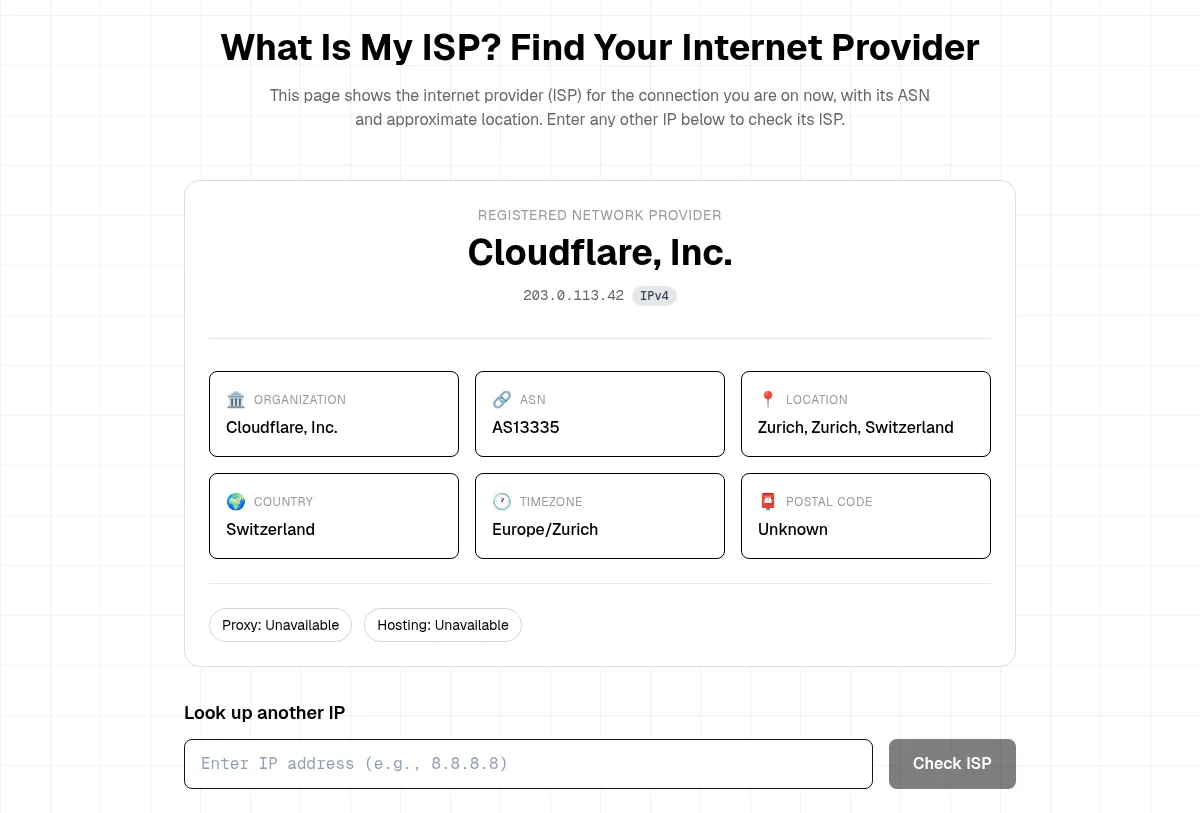
This is the real result card from our ISP Lookup page, captured on 13 November 2026. We replaced the real address with 203.0.113.42, a documentation address from RFC 5737. Below the card, Look up another IP takes any address you paste in.
On a phone, Wi-Fi and mobile data usually give two different answers, because they are two different networks. Find your ISP on your phone covers both. For the longer walk-through, including office and VPN cases, read how to find out your ISP.
What we saw: ISP lookup vs WHOIS on the same address
"Whois my ISP" usually means one of two things: the lookup above, or a WHOIS record for your IP. We ran both on the same addresses on 13 November 2026.
Our test machine's connection. ISP Lookup showed Cloudflare, Inc., ASN AS13335, located in Zurich. The ARIN registry record for the same address showed the network name CLOUDFLARENET, the range 104.16.0.0 to 104.31.255.255, the registrant Cloudflare, Inc., and separate abuse and NOC contacts.
Google's public DNS address, 8.8.8.8. ISP Lookup showed Google LLC, ASN AS15169, United States. The ARIN record showed the network GOGL, the range 8.8.8.0 to 8.8.8.255, and the registrant Google LLC.
Three things stand out:
- Both sources agreed on the owner. The lookup and the registry named the same company for each address.
- Neither named a home broadband brand. Our test machine sends its traffic out through Cloudflare's network, so every tool sees Cloudflare. A VPN, a mobile carrier or an office network has the same effect. The registered name is the network your traffic leaves from, not always the company on your bill.
- They answer different questions. The lookup adds the ASN and a rough location. The WHOIS record adds the full address range and who handles abuse reports. If you need to report spam or an attack from an IP, the abuse contact in the WHOIS record is the part you want.
The ISP for an IP address guide covers the lookup side for addresses from logs and email headers.
How to read a WHOIS record for an IP
Our WHOIS tool checks domain names, not IP addresses. For an IP, use the registry that manages the address block. There are five regional internet registries: ARIN (North America), RIPE NCC (Europe, Middle East, Central Asia), APNIC (Asia-Pacific), LACNIC (Latin America and the Caribbean) and AFRINIC (Africa). Each publishes its records through RDAP, the newer, structured form of WHOIS defined in RFC 9082 and RFC 9083. An example is ARIN's record for 8.8.8.8 at rdap.arin.net.
The fields that matter most:
- Name and handle: the registry's label for the network, such as
GOGL. - Start and end address: the whole block the owner holds. Your IP is one address inside it.
- Registrant: the organization the block is assigned to.
- Abuse contact: where to send a complaint about traffic from that range.
A WHOIS record does not show who was using an IP at a given moment. Only the provider's own records can tie an address to a subscriber, and providers release those only through legal process. The same limit applies to domain records, as our WHOIS lookup guide explains.
How to search ISPs by address
If your question is which companies can connect your home, an IP lookup will not help. In the US, enter the street address on the FCC National Broadband Map. It lists the providers and connection types that providers report to the FCC for that location. Commercial comparison sites use similar data, but always confirm availability with the provider before you order.
Outside the US, your national telecom regulator or the providers' own address checkers are the reliable source.
Quick answers
Can I find my ISP without a website? Yes. Your bill, your contract or the provider's account app names it. The lookup is faster when you are on an unfamiliar network.
Why does the ISP search show a company I don't pay? A VPN, a mobile carrier's core network, a company network or a relay service can sit between you and the internet. What a VPN changes on your IP shows how that looks.
Is an ISP lookup the same as tracking someone? No. It names the network that owns an address range and gives an approximate location. It does not identify a person or a home.