
Your public IPv4 address is the four-part dotted number, such as 203.0.113.42, that websites see when you connect to them over IPv4. To see it, open What Is My IP and check the small tag under the number. If it says IPv4, that is your answer. If another checker shows a long address with colons, such as 2001:db8::1, it measured your IPv6 address instead. Use a check that can only be reached over IPv4, as shown below. The number in your Wi‑Fi settings or in ipconfig that starts with 192.168 or 10. is your private address, not your public IPv4.
Why a checker shows IPv6 when you asked for IPv4
Many home and mobile connections are dual-stack: they have a public IPv4 and a public IPv6 address at the same time. When a site supports both, your device may choose IPv6 for that visit. Browsers race the two families, as described in RFC 8305 (Happy Eyeballs), and use whichever connects. The checker then reports the address that request used. Nothing is broken. Your IPv4 address still exists. That visit just did not use it.
So the question is not "how do I make my IPv6 go away". It is "which check can only answer in IPv4". The background on the two families is in IPv4 vs IPv6 for normal users. This post covers getting the IPv4 number.
What we saw when we tested it
On 27 Oct 2026 (07:51–07:53 CET), we ran the checks below on one Linux test machine. It is a cloud machine, not a home connection. Its traffic leaves through Cloudflare's network (AS13335), so the addresses below belong to Cloudflare, not to an ISP customer. The network it exits through has both IPv4 and IPv6, so it shows the IPv6-instead-of-IPv4 problem clearly.
1. The FindMyIP homepage showed IPv4. We looked up its DNS records. find-my-ip.net had an IPv4 (A) record and no IPv6 (AAAA) record that day. A browser can only reach it over IPv4, so the card showed an IPv4 address with the IPv4 tag:
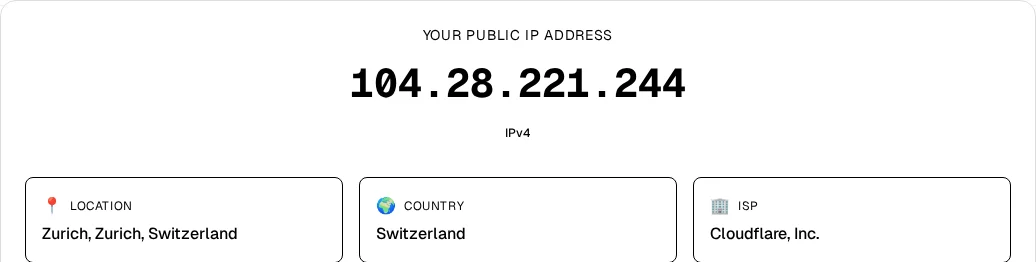
This is how the site is hosted today, not a separate IPv4 test, and it can change. The tag on the card always tells you which family the request used, so read it rather than assuming.
2. Dual-stack checkers showed IPv6 on the same machine. Services that have both record types answered in IPv6. Services with only an A record answered in IPv4:
$ curl https://api64.ipify.org      # has A and AAAA records
2a09:bac5:1e1b:a0::10:4ef
$ curl https://icanhazip.com        # has A and AAAA records
2a09:bac5:1e1f:188c::272:4b
$ curl https://api.ipify.org        # A record only
104.28.253.240
$ curl https://ipv4.icanhazip.com   # A record only
104.28.253.240
We checked the record types on dns.google the same morning. The IPv4 shown on our homepage (.244) and by the command line (.240) differ in the last part because this provider sends traffic out from a pool of addresses. A home line usually keeps one public IPv4 for longer.
3. curl -4 did not force IPv4 here. Most guides say to add -4. We ran curl -4 https://ifconfig.me/ip three times and got an IPv6 address each time. The machine reaches the internet through a tunnel proxy, and -4 only controls the first hop, from the machine to that proxy. The proxy then connected to the dual-stack site over IPv6. A VPN, a relay, or a corporate proxy can do the same. A host with no IPv6 record cannot be reached over IPv6, which makes it the more dependable check.
How to get your IPv4 address
Pick the first method that fits:
- Browser: open What Is My IP and confirm the tag says IPv4.
- Command line, macOS or Linux:
curl https://api.ipify.orgorcurl https://ipv4.icanhazip.com. Both had only A records when we checked. - Command line, Windows 10 and 11: type
curl.exe https://api.ipify.org. In Windows PowerShell 5.1, plaincurlis an alias for a different command. - Router: the status page may show a WAN or Internet IPv4. That can match the public IPv4. If it starts with
100.64to100.127, your ISP shares one public IPv4 among many customers (carrier-grade NAT). Paste it into the CGNAT Check to classify it.
More ways to read the public address, on any device, are in how to find your public IP address.
You do not need to turn off IPv6 to see your IPv4. That changes your connection for every app. An IPv4-only check answers the question without changing anything.
When there is no IPv4 answer, or it looks strange
- The IPv4-only check fails or times out. Your network may be IPv6-only for that device, or something blocks the probe. Try another IPv4-only host before deciding.
- You are on mobile data. Some carriers give phones only IPv6 and translate to IPv4 at their own gateway (NAT64 or 464XLAT). The IPv4 you see then belongs to the carrier's gateway and is usually shared.
- A VPN is on. You will see the VPN server's IPv4, not your ISP's. Turn the VPN off if you need your own.
- You see
::ffff:203.0.113.42. That is an IPv4 address written in IPv6 notation, often found in server logs. The part after::ffff:is the IPv4 address. - Every device at home shows the same IPv4. That is normal. The router shares one public IPv4 for the whole household.
Bottom line
Your IPv4 address is the dotted public number IPv4 sites see. If a checker shows a colon-style address, it measured your IPv6 instead. Use a check that cannot answer over IPv6: the What Is My IP homepage, which had only an IPv4 record when we tested on 27 Oct 2026, or an A-only host like api.ipify.org. Read the IPv4/IPv6 tag every time, and do not rely on curl -4 alone if a VPN or proxy sits in the path.