
Yes, IP addresses change, but not all at once: each address you have runs on its own clock. Your public IPv4 address usually changes only when your provider hands out a new lease, which on many home lines happens rarely. Your IPv6 addresses can change every day by design. The local address each device gets from your router changes when the router decides. To see the public one right now, open What Is My IP, and to check any other address, use IP Lookup.
A laptop on home Wi-Fi typically has at least three addresses at once. Asking "does my IP change" without saying which one is why answers online seem to contradict each other.
Which address changes, and on what clock
| Address | Who assigns it | What usually changes it |
|---|---|---|
| Public IPv4 (what websites see) | Your internet provider | A new lease after a long outage, a new modem or router, provider maintenance, a plan change. Many home lines keep one for weeks or months. |
| IPv6 prefix (the first half of your IPv6 address) | Your internet provider | Some providers keep it fixed, some rotate it daily or after a reconnect. |
| IPv6 temporary address (the full address your device uses outward) | Your own device | A timer. The standard default is a new one every day (RFC 8981). |
| Private LAN IP (192.168.x.x, 10.x.x.x) | Your router | A DHCP lease running out while the device is away, a router reset, or a new Wi-Fi "private address" on a phone. |
| Mobile data IP | Your mobile operator | Often a new one after airplane mode or a reconnect, and many phones share one with other customers. |
The public IPv4 address and the private LAN address both come from DHCP leases (RFC 2131): a loan for a set time that the device renews before it runs out. A renewal usually returns the same address, which is why a home connection can keep its public IP for a long time. What DHCP is explains the lease in more detail.
Our own result card
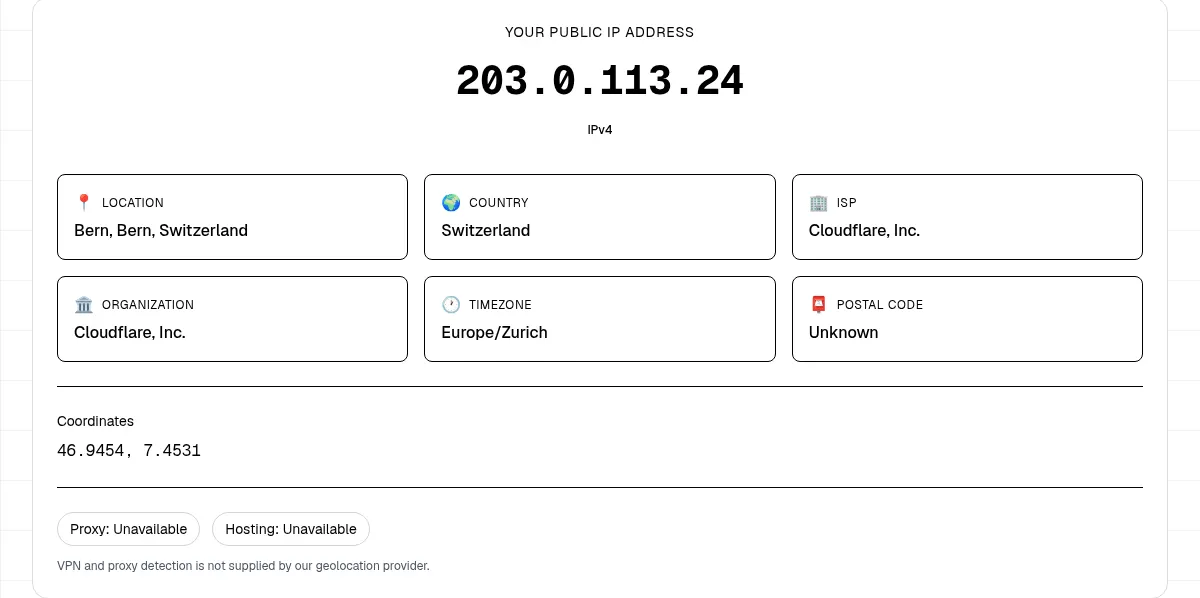
This is the result card on our homepage from a test machine on 26 Nov 2026. We replaced the real address with 203.0.113.24, a documentation address that is never used on the internet (RFC 5737). The number at the top is the public address for that one request. The ISP line names the network that address belongs to, here Cloudflare, because that machine reaches the internet through Cloudflare's network rather than a home provider.
We asked for our IP 20 times in 32 seconds
On 26 Nov 2026, between 07:29:52 and 07:30:24 Swiss time, we sent 20 requests to our own address API from that same test machine, about one per second:
curl https://find-my-ip.net/api/ip
| What we compared | Result |
|---|---|
| Requests | 20 |
| Different public IPv4 addresses | 13 |
| Network (ASN) | The same on all 20 (AS13335) |
| City shown | Bern on all 20 |
| First two blocks of the address | The same on all 20 |
So the "IP address" of that machine changed on most requests, without a reboot, a new lease or a move. Its traffic leaves through a shared pool of addresses, and each new connection can get a different one. Sample: one cloud machine, one half-minute. It does not describe a typical home line. It shows the extreme end of the scale.
A home connection sits at the other end. Behind a normal router, every request uses the same public IPv4 address until the lease changes. If your public IP changes on every page load at home, the likely causes are a VPN or privacy relay, or a provider that shares addresses between customers with CGNAT. How to tell if you're behind CGNAT shows how to check that.
Why IPv6 addresses change on purpose
An IPv6 address has two halves. Your provider assigns the first half, the prefix. Your device builds the second half itself. If that second half never changed, every website could recognise the same device across networks and months.
To prevent that, devices use temporary addresses for outgoing connections and replace them on a timer. RFC 8981 sets the default preferred lifetime to one day. On the same test machine, the Linux defaults read temp_prefered_lft = 86400 seconds (one day) and temp_valid_lft = 604800 seconds (seven days). That machine also had temporary addresses switched off (use_tempaddr = 0), which is common on servers and shows the setting is up to the device. A daily IPv6 change on your laptop or phone is normal. Nothing is wrong. IPv4 vs IPv6 explains how the two run side by side.
Do IP addresses change with the device?
Yes. Every device on your network gets its own private address from the router, and the router can give a device a different one after the lease runs out. Many phones also use a random Wi-Fi hardware address for each network, so the router may treat the phone as new and hand it a new local IP. If a printer or game console keeps losing its address, set a DHCP reservation for it in the router.
All devices on the same home network share one public IPv4 address, so moving from your laptop to your phone on the same Wi-Fi does not change what websites see over IPv4.
How to tell if your IP address has changed
- Open What Is My IP and note the address and the IPv4 or IPv6 tag.
- Check again later, on the same network and with any VPN switched off.
- Compare like with like: IPv4 with IPv4, IPv6 with IPv6. A switch from IPv4 to IPv6 between checks is not a change of your IPv4 address.
If the public IPv4 address is different, your provider assigned a new one. If only the IPv6 address differs, that is usually your device's daily temporary address. To check whether a reboot changes yours, follow the router restart test.
Bottom line
IP addresses change, each on its own schedule. A home public IPv4 address often stays the same for weeks or months. IPv6 temporary addresses change about daily by design. Local addresses change when the router reassigns them. A shared pool can hand out a new public address on every connection. For the reasons a home IP changes and how to keep one stable, see Does your IP address change?.