
Your IP is the public address every website you open sees, and you can read it at the top of What Is My IP right now. It looks like 203.0.113.24 (IPv4) or 2001:db8::24 (IPv6). It belongs to your internet connection, not to your device, and your provider can change it. The number itself also tells you a few things, and the page you check it on can pass it to more companies than you expect.
Our own result card
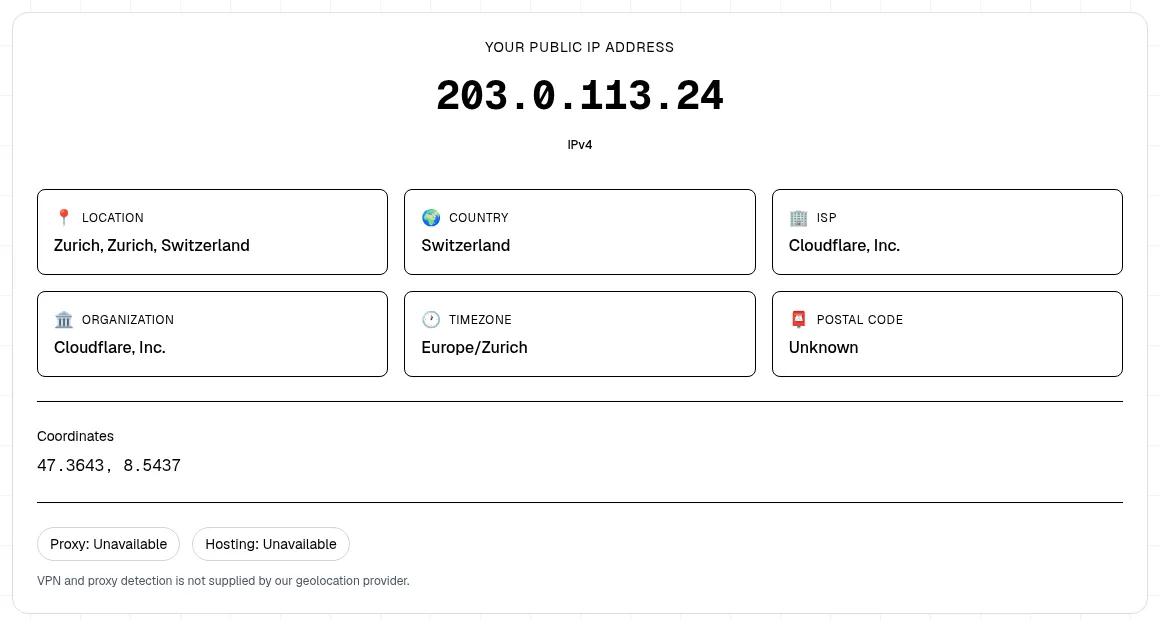
This is our homepage result from a test machine on 27 Nov 2026. We replaced its real address with 203.0.113.24, a documentation address that is never used on the internet (RFC 5737). Read it from the top:
- The big number is the address our server saw for that request. That part is a measurement.
- IPv4 or IPv6 says which kind of connection the request used. Many homes have both, so two checks can show two different numbers.
- ISP and organization name the network that owns the address. Here it is Cloudflare, because that machine reaches the internet through Cloudflare's network.
- Location and coordinates are a database estimate for the address, not your position. How accurate IP geolocation is explains why the city can be wrong.
What the number tells you
Some address ranges are reserved, so the digits alone tell you what kind of address you are looking at. That helps when a router page, a game console or a log shows you an address and you want to know whether it is the one websites see.
| If the address starts with | What it is | Seen by websites? |
|---|---|---|
10., 172.16. to 172.31., 192.168. |
Private address from your router (RFC 1918) | No |
100.64. to 100.127. |
Shared address inside your provider's network, used for CGNAT (RFC 6598) | No |
169.254. |
Self-assigned address when DHCP failed (RFC 3927) | No |
127. |
Your own device (loopback) | No |
192.0.2., 198.51.100., 203.0.113. |
Documentation examples, like the one in our screenshot | No |
fe80: |
IPv6 link-local, only on your own network (RFC 4291) | No |
fc or fd (IPv6) |
IPv6 unique local, private to a network (RFC 4193) | No |
2 or 3 (IPv6), or any other IPv4 |
A global address | Yes |
So if your router's internet (WAN) address starts with 100.64 while a checker shows something else, your provider most likely shares one public address between customers. The CGNAT Check compares the two for you, and what CGNAT is explains what it means for port forwarding.
To look up the owner and estimated location of any global address, paste it into IP Lookup.
We loaded 10 IP checkers and counted who else sees your IP
Every website you open sees your public IP, because it needs it to send the page back. The same is true for every other server the page loads files from: ad networks, analytics, tag managers, chat widgets. Each of those requests carries your IP too.
On 27 Nov 2026 we loaded the top 10 Google results for "whats my ip" (US results) plus our own homepage. We used headless Chrome on one test machine in Zurich, loaded each page once, clicked no cookie banner, and counted requests for 10 seconds after the page loaded. We then counted the distinct domains that did not belong to the site itself.
| Page | Requests | To other domains | Other domains |
|---|---|---|---|
| expressvpn.com/what-is-my-ip | 132 | 120 | 16 |
| whatismyipaddress.com | 73 | 53 | 15 |
| surfshark.com/what-is-my-ip | 78 | 46 | 13 |
| whatismyip.com | 67 | 43 | 12 |
| ipgeolocation.io/what-is-my-ip | 138 | 74 | 10 |
| whatsmyip.com | 44 | 27 | 8 |
| whatismyip.unc.edu | 32 | 10 | 6 |
| myip.com | 56 | 35 | 6 |
| whatsmyip.org | 27 | 16 | 4 |
| blackswancyber.co.uk | did not load within 30 seconds | ||
| find-my-ip.net (ours) | 52 | 0 | 0 |
The other domains were mostly Google advertising and tag services (doubleclick.net, googletagmanager.com), plus names such as facebook.net, clarity.ms, amazon-adsystem.com and consent platforms. Some are harmless file hosts, such as font services. We counted domain names, so google.com and google.ch count as two.
Sample: one load per page, one machine, one morning, before any consent choice. Ad loads change from visit to visit, and accepting cookies on these pages would likely add more. Our own count is before a consent choice too: our site loads Google Analytics only if you accept it. The point is not that these sites are unsafe. A checker shows you a number that dozens of other servers may also receive in the same second.
How to check your IP with fewer extra servers
- Use a lightweight page. Fewer third-party requests means fewer companies that log your visit with your IP.
- Use a terminal.
curl https://find-my-ip.net/api/ipreturns your address as plain JSON, with no page, ads or scripts. How to find your public IP shows other terminal commands, including the one for Windows. - Check the address bar. Lookalike domains copy checker layouts. Your IP itself is not a secret, but a fake page can push downloads or "your IP is exposed" warnings.
- Check before and after a VPN. If the number and ISP change when the VPN is on, websites now see the VPN's address. What a VPN changes on your IP covers what it does not hide.
Knowing your IP does not let a stranger into your devices. It points to your provider and a rough area. What your IP address reveals goes through who sees it and what they can learn.
Bottom line
Your IP is the public number every site sees. Read it at the top of a checker, trust the address and the network name, and treat the city as an estimate. The first digits tell you whether an address is private, shared by your provider, or public. And the page you check it on may share it with a dozen other servers, so a lightweight page or a one-line terminal command is the quieter way to look.