
Network address translation (NAT) is how your router lets many home devices share one public IP. Each phone, laptop, and TV keeps a private LAN address; the router rewrites outbound packets so the internet sees the router's public (or ISP-facing) address, then maps replies back to the right device. Without NAT, every gadget would need its own globally unique IPv4 address.
For the difference between the two kinds of address, see public vs private IP. For the ISP-scale layer on top of home NAT, see what is CGNAT.
How many devices share one public IP
On a typical home IPv4 line, the whole household shares one public IPv4 that sites and games see. Inside the LAN, devices use private addresses from RFC 1918 — 10.0.0.0/8, 172.16.0.0/12, and 192.168.0.0/16. Those numbers are reused in every home and are not meant to travel the open internet as-is. The router is the edge translator: many private sources become one internet-facing address, with port numbers keeping flows apart.
If your ISP also shares that public IPv4 across many customers, that is CGNAT — an extra NAT layer upstream. Home NAT and CGNAT can both be true at once.
What the router's translation table does
NAT is not a vague firewall setting. It is a mapping table the router updates for every outbound conversation:
- Your laptop at
192.168.1.42opens a connection to a website. - The router records something like: private
192.168.1.42:54321↔ WAN203.0.113.10:40001. - The website replies to
203.0.113.10:40001; the router forwards it to192.168.1.42:54321.
203.0.113.10 is a documentation address (RFC 5737), not a real customer IP. The point is the pair: private host + port on one side, WAN address + port on the other.
When the conversation ends, the mapping ages out. That is why inbound connections from strangers usually fail unless you add a port forward, enable UPnP for a game, or run a relay — the router has no row for unsolicited traffic.
Static NAT, dynamic NAT, and PAT (in plain words)
Vendors name three common patterns. Home gear almost always uses the third.
- Static NAT — one private address permanently mapped to one public address. Rare on consumer broadband.
- Dynamic NAT — private hosts borrow from a small public pool; when the pool is empty, new sessions wait.
- PAT (NAT overload) — many private hosts share one public IP via different port numbers. This is what nearly every home router does.
If a home-gateway article says "NAT" without qualifiers, it almost always means PAT.
Console NAT types: Open, Moderate, Strict (and Type 1 / 2 / 3)
Game consoles and some PCs label how reachable you are for peer-to-peer matchmaking:
| Label (Xbox-style) | Sony-style | What it usually means |
|---|---|---|
| Open | Type 1 | Outsiders can reach the console for P2P; hosting and joining are least restricted |
| Moderate | Type 2 | Some filtering; you can play, but hosting or certain party features may fail |
| Strict | Type 3 | Heavy filtering; matchmaking often needs relays; voice/party issues are common |
These labels are not a separate protocol. They describe how much of your NAT and firewall setup blocks unsolicited inbound traffic to the console.
What changes the type
- UPnP (or similar automatic port mapping) — consoles ask the router for temporary mappings. On a single NAT that often yields Open / Type 1 or Moderate / Type 2.
- Manual port forwards — forwarding the console's ports to a fixed LAN IP when UPnP is off.
- Double NAT — two routers both translating (ISP gateway + your router, or modem-router + mesh). The outer box never learns the console's mappings, so you often land on Strict / Type 3 until you bridge the outer device or put the inner router in access-point mode.
- CGNAT — the ISP's shared public IP has no map to your console. Home port forwards cannot fix inbound reachability there. Details: why port forwarding fails on CGNAT.
NAT type is about inbound reachability for games, not whether browsing works. Everyday HTTPS still works on Strict.
How to see NAT on your connection
You cannot "turn NAT off" on a normal home IPv4 plan and keep private LAN addresses. You can see how many layers sit between you and the public internet by comparing three readings.
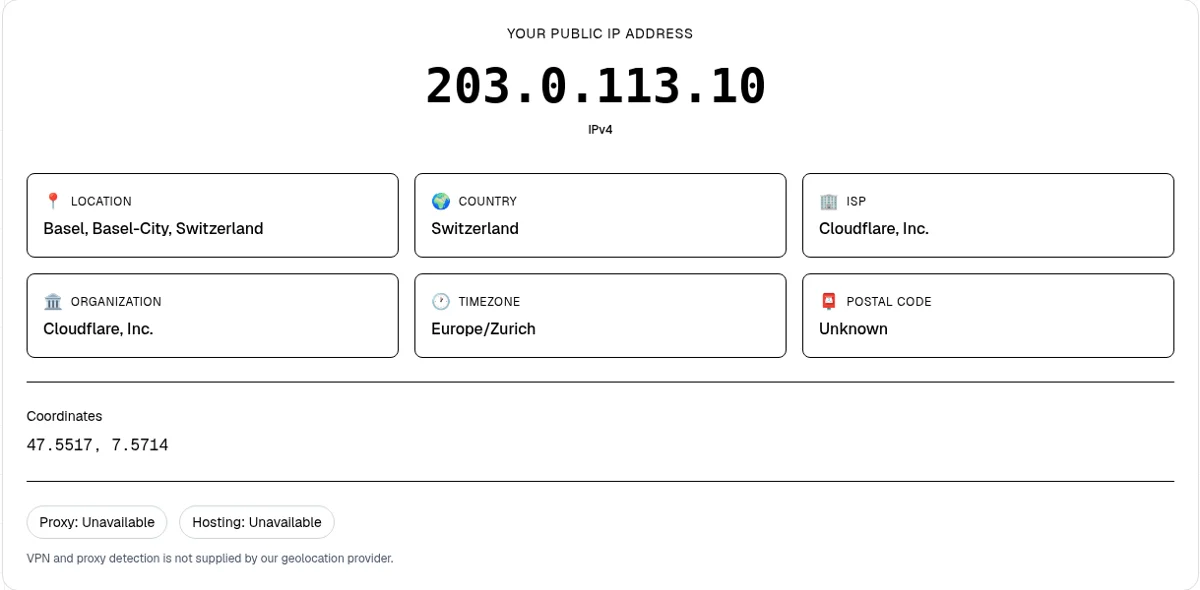
1. Public IP (what sites see)
Open What Is My IP. That is the address remote servers log for this browser request. Turn off VPN or Private Relay first, or you will see the exit instead of your line.
2. Router WAN IP (what your line was given)
Log into the router admin page and find WAN, Internet, or External IP. What is a WAN IP address shows where that field usually sits.
3. Classify with the CGNAT check
Paste the WAN address into the CGNAT check. It labels the site's public IP and your pasted WAN as shared space (100.64.0.0/10 per RFC 6598), RFC 1918 private, another reserved range, or public. It is not a magic yes/no badge — confirm with the ISP before buying an add-on.
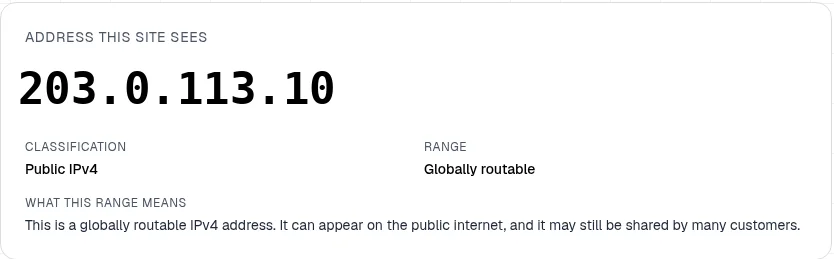
How to read the comparison
- WAN matches the homepage public IP, and both look public — classic single home NAT. Devices share that one public IPv4 through your router.
- WAN is in
100.64.0.0/10or another private range, and the homepage shows a different public IP — extra NAT upstream (often CGNAT) or a second router at home. See what is CGNAT. - Both look public but disagree — less common; check for a device VPN, a business gateway, or a mis-copied field. What a VPN changes on your IP covers the exit-IP case.
NAT vs firewall (and vs CGNAT)
NAT rewrites addresses and ports. A firewall allows or blocks traffic by rule. Home routers do both, so people blur the words. Closing ports in the firewall can look like "Strict NAT" even when the translation table would otherwise work.
CGNAT is NAT at ISP scale: many homes behind one shared public IPv4, while your router still NATs the LAN. If your WAN and public numbers disagree, how to tell if you're behind CGNAT walks through the next checks.
Bottom line
Network address translation is the reason one public IPv4 can serve an entire household of private devices. The router keeps a translation table, almost always with PAT. Console Open / Moderate / Strict labels (Type 1 / 2 / 3) describe inbound game reachability and move with UPnP, port forwards, double NAT, and CGNAT — not with whether Netflix loads. To see your own layers, compare What Is My IP, your router WAN, and the CGNAT check.