
Your internet address is your public IP address, short for Internet Protocol address. It is the number every website, app and game server sees when your connection reaches them, such as 203.0.113.42 (IPv4) or a longer colon-style address like 2001:db8::1 (IPv6). To see it, open What Is My IP: the big number at the top is your internet address right now. The number in your phone's or computer's Wi‑Fi settings, usually starting with 192.168, 10. or 172.16 to 172.31, is a private address that only exists inside your home network. Every device at home normally shares the same internet address, because your router stands in front of all of them.
Internet address, IP address, public IP: same thing
People search for this in many ways: "what's my internet address", "my internet protocol address", "my internet IP". They all point to the same number. "IP" stands for Internet Protocol, the set of rules that moves data across the internet. Every packet carries a sender and a receiver address, and the sender address the outside world sees is your internet address.
It is not:
- your street address. An IP lookup can only estimate a region, often the city where your provider routes traffic. Why that estimate is rough is in how accurate IP geolocation is.
- your email address or a web address.
name@example.comandexample.comare names. Your connection's internet address is a number. - the address in your device settings. That one is private. The difference is explained in public vs private IP address.
What we saw when we tested one machine
On 30 Oct 2026 (07:51–07:53 CET), we checked every "address" one Linux test machine could show us. It is a cloud machine, not a home line. Its traffic leaves through Cloudflare's network, so the public addresses below belong to Cloudflare, not to an ISP customer. The pattern is the same at home.
1. The machine itself only knew private addresses. Asking the operating system for its addresses returned:
$ ip -4 -br addr
lo        UNKNOWN   127.0.0.1/8
enp0s3    UP        172.30.0.2/24
docker0   DOWN      172.17.0.1/16
$ ip route show default
default via 172.30.0.1 dev enp0s3
127.0.0.1 is the machine talking to itself, and docker0 is an unused internal bridge. 172.30.0.2 is in a private range, and 172.30.0.1 is the gateway the machine sends everything to. Its only IPv6 address started with fe80:, a link-local address that never leaves the local network. None of these is the internet address. A device cannot read its internet address from its own settings when a router or gateway sits in front of it. It has to ask something out on the internet.
2. Asking the internet gave a different number, and sometimes two. Checks that only answer over IPv4 returned 104.28.195.95. A check that also answers over IPv6 returned 2a09:bac1:1700:1a8::10:4b2 from the same machine at the same minute. One connection can have an IPv4 and an IPv6 internet address at once. Which one a site sees depends on which family the connection used. The IPv4 post shows how to get the IPv4 one when IPv6 shows up.
3. The FindMyIP homepage showed a third value two minutes later.
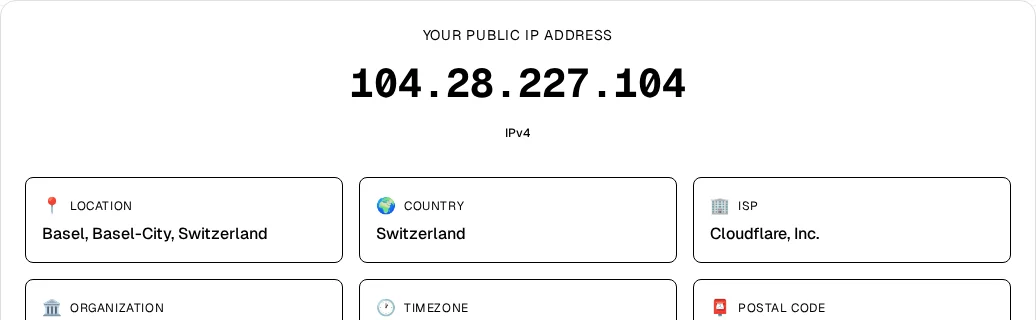
The card read 104.28.227.104, tagged IPv4, with Basel as the estimated location and Cloudflare, Inc. as the ISP. The address changed between checks because this network sends traffic out from a pool of addresses. A typical home line keeps one internet address for days or longer. When and why it changes is covered in does your IP address change.
The lesson from the test: the number in your settings tells you about your home network. The number a website shows tells you what the internet sees. Only the second one is your internet address.
How to see your internet address
- Any browser: open What Is My IP. The number at the top is your internet address. The tag under it says IPv4 or IPv6, and the cards show the estimated location and the provider.
- Want the provider name too: the ISP lookup shows which network the address belongs to.
- Command line: on macOS or Linux,
curl https://api.ipify.orgprints your IPv4 internet address. On Windows 10 and 11, typecurl.exe https://api.ipify.org. - Router page: the status page may show the address under a label such as Internet, WAN or External IP. It usually matches what a website shows. If it starts with
100.64to100.127, your provider shares one internet address among many customers. Paste it into the CGNAT Check to confirm. More on that router field: what is a WAN IP address.
What you will not find there: ipconfig on Windows, Wi‑Fi details on iPhone or Android, and System Settings → Network → Wi‑Fi → Details → TCP/IP on a Mac all show the private address. More ways to check from any device are in how to find your public IP address.
Why your internet address might look "wrong"
- A VPN is on. Sites see the VPN server's internet address, not yours. Switch the VPN off to see your own.
- Wi‑Fi vs mobile data. Your phone has a different internet address on each. On mobile data, it belongs to your carrier and is often shared.
- Work or school network. The address belongs to that organisation's network, not your home.
- Two checkers disagree. One may have measured IPv6 and the other IPv4, or your network uses a pool of exit addresses, as in our test.
- The location is a different town. That is normal for IP location. It points at your provider's network, not your house.
If you are not sure which of several numbers someone is asking for, what is my network IP address explains the three common meanings.
Bottom line
Your internet address is your public IP address, the Internet Protocol address that websites see for your connection. Your devices do not show it in their settings, because they only know their private home-network address. To see the real one, open What Is My IP and read the number and its IPv4 or IPv6 tag. Expect it to change with a VPN, a different network, or over time.