
To tell if the internet is down in your area, rule out your own devices and router first, then check your provider's outage page or app. If every device in the home fails, the modem's internet light is off or red, and a phone on mobile data can still load pages, the fault sits between your home and your provider. Your provider's status page, or a crowdsourced map such as Downdetector, then tells you whether neighbors see the same thing. If only one device fails, it is not an area outage.
Most outage pages answer only the last question, and many need your service address or a sign-in. The checks below take about five minutes and need neither.
Check your own connection first
Work from the inside out. Each step removes one place where the problem can hide.
- One device or all of them? Try a second phone, laptop or TV on the same Wi-Fi. If only one device fails, restart its Wi-Fi, forget and rejoin the network, or restart the device. That is a device problem, not an outage.
- Wi-Fi or the line? If you can, plug a laptop into the router with a cable. Cable works but Wi-Fi does not: the problem is the wireless side of your router, not your provider.
- What do the lights say? Look at the modem or the combined modem-router. Most models have a light for the internet or WAN connection. Off, red or blinking for minutes usually means the box has no link to your provider. Your manual or the provider's support page says what each color means on your model. If you are unsure which box is which, see modem vs router.
- Is there a self-assigned address? A device that shows an IPv4 address starting with
169.254did not get an address from your router. That range is link-local only (RFC 3927) and cannot reach the internet. How DHCP works at home explains why it happens. - Does a second network work? Turn off Wi-Fi on your phone and load a page on mobile data. If mobile data works and home internet does not, the problem is your home line or your provider, not the website you were trying to open.
If a page loads at all, run a quick test. Our speed test measures download, upload and HTTP latency between your browser and FindMyIP.net.
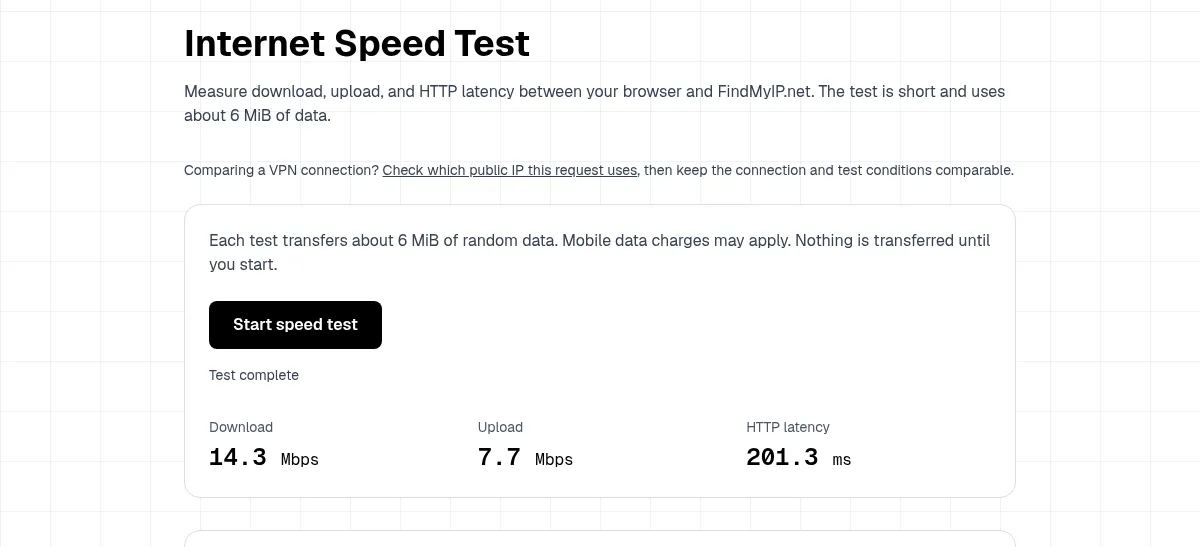
That is a real run from our test on 19 Nov 2026, on one connection. A result like this means the line works, just slowly; that is a different problem from an outage. Slow but working points to Wi-Fi range, a busy line or congestion at the provider. No result at all, on every device, points back to the modem or the provider. Read what a speed test measures before comparing the numbers with your plan.
Then check your provider and your area
Once your own side is ruled out, look outward.
- Your provider's outage page or app. Large US providers such as Xfinity, Spectrum, AT&T, Verizon, Cox and Frontier run outage pages. Many ask for your service address or a sign-in before they show area-level status. Have your account login ready, and check it from your phone on mobile data.
- Crowdsourced maps. Downdetector and similar sites collect user reports. A spike in reports for your provider in the last hour is a strong hint. No spike does not prove your line is fine: reports build up only after enough people complain, and small providers may not be listed.
- Neighbors and local groups. A neighbor on the same provider is the fastest local check. If they are fine too, the fault is more likely in your home.
- Call or chat with your provider. Support can often see a line fault that no public map shows. Ask whether there is a known outage at your address and when they expect a fix.
Not down, just one site or app?
Sometimes the internet works, but one site or app does not. If other sites load, the issue is narrower. It can be that service, a DNS problem or your browser. Our guide on whether a site is down or it is a DNS/IP issue walks through those checks. If names do not resolve but the line is up, flushing the DNS cache is a quick test.
What to do during an outage
- Restart once, not ten times. Unplug the modem and router, wait about 30 seconds, then power the modem first and the router after the modem's lights settle. Repeated restarts during a provider outage do not help and lose you the useful baseline.
- Note the time and the lights. If you call support, the start time and which lights are on save time.
- Use mobile data with care. Hotspot use can count against your data cap. Check your plan before streaming.
- Ask about credit. Some providers credit long outages. Ask support what applies to your plan.
Quick answers
How do I check if the internet is down in my area? Check a second device and mobile data first. If home internet fails on every device and mobile data works, open your provider's outage page or app, then a crowdsourced map.
How do I check if my Wi-Fi is down rather than the internet? Plug a device into the router with a cable. If the cable works, the internet is up and the Wi-Fi side is the problem.
Why is my internet not working right now if there is no outage? A single device, the Wi-Fi signal, the router or a DNS problem can all stop pages from loading while your provider's line is fine. Work through the checks above in order.